


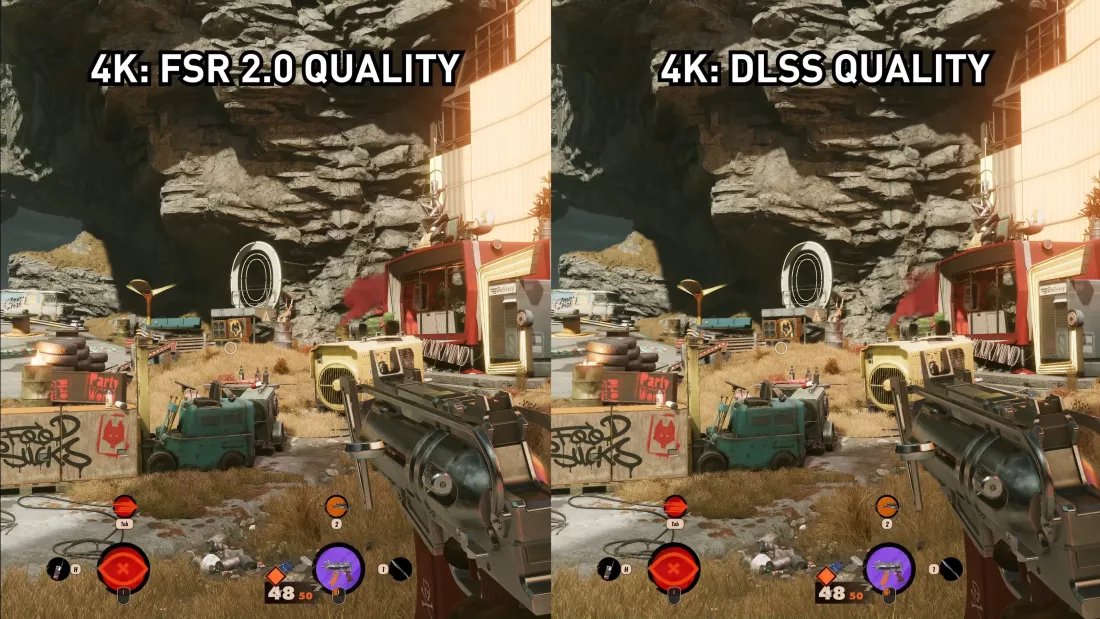
DLSS vs. FSR: which is better? As the gaming industry continues to push the boundaries of visual fidelity and performance, achieving the perfect balance between stunning graphics and smooth gameplay remains a top priority for developers and gamers alike. Enter two revolutionary upscaling technologies: NVIDIA’s Deep Learning Super Sampling (DLSS) and AMD’s FidelityFX Super Resolution (FSR). These technologies have redefined the gaming experience, allowing players to enjoy high-quality visuals without sacrificing performance, even on mid-range hardware.
DLSS and FSR represent two different philosophies and approaches to solving a common challenge in modern gaming: delivering high-resolution visuals without the computational burden of native rendering. While both aim to enhance performance and image quality, they do so through fundamentally different methods. DLSS leverages the power of AI and dedicated hardware, taking full advantage of NVIDIA’s Tensor Cores, whereas FSR relies on a more open and accessible approach, making it available on a wider range of GPUs, including older and competing hardware.
But which one truly reigns supreme? Is DLSS’s AI-driven precision worth the hardware exclusivity, or does FSR’s universal accessibility give it the edge? In this article, we’ll dive deep into the technology behind each solution, compare their real-world performance, and explore how they impact gaming across different hardware, resolutions, and titles. Whether you’re an enthusiast debating which GPU to invest in or a gamer seeking to maximize your current setup, understanding DLSS and FSR is crucial in navigating the future of gaming.
What Is DLSS? A Look at Nvidia’s Game-Changer
DLSS, short for Deep Learning Super Sampling, is Nvidia’s proprietary upscaling technology that leverages the power of artificial intelligence (AI) to deliver exceptional results. Built exclusively for Nvidia’s RTX GPUs, DLSS uses specialized hardware called Tensor Cores to process lower-resolution images and reconstruct them with incredible detail.
The technology works by training its AI models on high-resolution images, allowing it to predict and recreate details with impressive accuracy. As a result, DLSS not only improves performance by lowering the rendering resolution but also enhances image quality—sometimes making it appear sharper than the native resolution.
Key Advantages of DLSS

- Superior image quality with fewer artifacts, especially in motion-heavy scenes.
- Significant frame rate improvements, particularly in demanding titles and at higher resolutions like 4K.
- Exclusive optimizations for RTX GPUs, ensuring the best possible performance when paired with Nvidia’s hardware.
Limitations
- Compatibility is restricted to Nvidia’s RTX lineup, leaving older Nvidia GPUs and AMD cards out of the equation.
- Requires game developers to integrate DLSS into their titles, meaning it’s only available in supported games.
What Is FSR? AMD’s Inclusive Approach to Upscaling
FidelityFX Super Resolution (FSR) is AMD’s answer to the upscaling challenge. Unlike DLSS, FSR is an open-source technology, which makes it far more accessible. It works across a wide variety of hardware, from AMD and Nvidia GPUs to even integrated graphics, making it a versatile option for gamers.
FSR uses a spatial upscaling technique to reconstruct a higher-resolution image from a lower-resolution one. While the earlier FSR 1.0 used simpler algorithms, the introduction of FSR 2.0 brought more sophisticated temporal data and anti-aliasing techniques, narrowing the gap in image quality between FSR and DLSS.
Key Advantages of FSR
- Works on a broad range of hardware, including older GPUs.
- No specialized hardware (like Tensor Cores) is required, making it accessible even to budget-friendly systems.
- Easy for developers to implement, leading to faster adoption across games.
Limitations
- While FSR 2.0 improves quality significantly, it can still fall short of DLSS in terms of preserving fine details, particularly in fast-paced scenes.
- FSR’s performance gains, while impressive, may not match the AI-driven results of DLSS in all scenarios.
Can I Use DLSS 3.5 on Any Game?
DLSS vs. FSR: A Detailed Comparison
Now that we understand what DLSS and FSR are, let’s compare the two technologies across several key factors to see which one suits your gaming setup.
Image Quality
- DLSS: Thanks to its AI-driven reconstruction, DLSS consistently delivers sharper and more detailed visuals, especially in motion-heavy scenes or games with intricate textures. DLSS 3, the latest iteration, even introduces frame generation, creating entirely new frames for smoother gameplay.
- FSR: While FSR 2.0 has closed the gap considerably, it can still introduce slight artifacts or softness compared to DLSS. At resolutions like 4K, the difference might be negligible, but at lower resolutions, DLSS often holds the edge.
Performance Gains
- DLSS: Leveraging Tensor Cores allows DLSS to deliver excellent performance boosts, particularly at lower resolutions where the hardware can shine.
- FSR: FSR provides solid performance gains as well, especially when paired with older hardware. However, its performance can sometimes lag behind DLSS in games that are optimized for Nvidia GPUs.
Compatibility and Hardware Support

- DLSS: Nvidia keeps DLSS exclusive to its RTX series, meaning gamers with older GPUs or AMD hardware are out of luck.
- FSR: FSR is the clear winner here. Its open-source nature allows it to run on a wide range of GPUs, including Nvidia, AMD, and even integrated graphics on laptops.
Ease of Use
- Both DLSS and FSR are relatively simple to enable, provided the game supports them. They’re typically toggled on through a game’s graphics settings, with different quality presets (e.g., Performance, Balanced, Quality) to suit your preference.
What About DLSS 3 and Beyond?
The gaming world is abuzz with Nvidia’s latest iteration, DLSS 3, which introduces groundbreaking frame generation technology. This feature creates entirely new frames, further boosting performance without overburdening the GPU. However, DLSS 3 is exclusive to the RTX 40-series GPUs, making it inaccessible to older RTX cards or AMD hardware.
On the other hand, AMD continues to iterate on FSR, with rumors suggesting that FSR 3.0 will include features similar to frame generation, potentially narrowing the gap even further.
Can I Use DLSS 3.5 on Any Game?
DLSS vs. FSR: Which One Should You Choose?
The decision between DLSS and FSR ultimately depends on your priorities and hardware:
- Choose DLSS if you have an Nvidia RTX GPU and want the best combination of image quality and performance. DLSS is especially effective at higher resolutions and in graphically demanding games.
- Choose FSR if you’re using older hardware, non-Nvidia GPUs, or integrated graphics. FSR’s broad compatibility and impressive performance gains make it an excellent choice for gamers with more modest setups.
Both technologies are evolving rapidly, with new versions promising even better performance and image quality. Whichever you choose, DLSS and FSR represent a bright future for gaming, ensuring players can enjoy stunning visuals without compromising smooth gameplay.